Descript Underlord Prompts that Work for Me
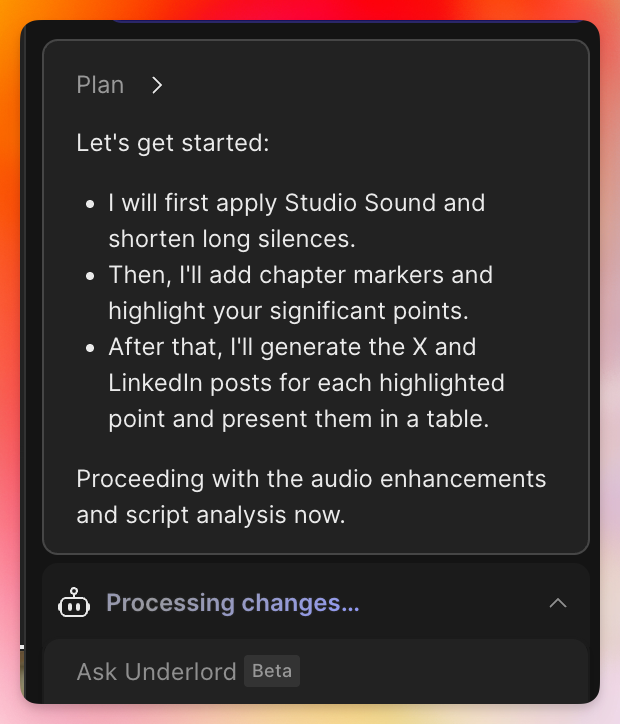
I use Descript because it is the best out there. They’re constantly making it better, too. I use it for anything where I have recorded audio or video.
There are many other tools out there to transcribe or edit, but Descript has the best of both worlds.
They have a tool called Underlord that allows you to “vibe edit” where you just give it directions and it does it for you.
I’m adding some here to share with others and keep a record for myself.
Repurposing speaking clips
Here’s the prompt for Underlord:
these are recordings from a presentation that I gave. I am Jethro Jones. Apply studio sound, and shorten silences that are longer than 3 seonds. Add chapter markers, many of them, and find the spots where I was speaking and make significant poignant points, and highlight them. Then write a X post and a linkedin post for each one, return these in a table. The posts should be written in a tone that matches the platform.
I was using a rode wireless pro mic to capture my voice and it caught some audience participation as well. I ran this on two recordings, one that was just over an hour and one that was just under 4 hours! It wasn’t perfect, but it did a pretty good job. What’s really nice is that I can set that to work and do other tasks (like writing this up) while I’m waiting.
I also remember where I said some worthwhile things and that’s good, but this helps highlight things better and easier for repurposing.
For example, here are some of the posts that came from the 47 highlights it made in the 77 minute recording:
| Highlighted Point | X (Twitter) Post | LinkedIn Post |
|---|---|---|
| “If the solution is complex, then people just aren’t gonna do it. If the solution is simple, then people are gonna be like, oh yeah, I can do that.” | Simplicity wins. If your solution is too complex, it won’t stick. Make it simple, make it actionable. #Leadership #Innovation | The most effective solutions are often the simplest. Complexity can be a barrier to action, while simplicity empowers teams to move forward. As leaders, let’s focus on making change accessible and actionable. #Leadership #ChangeManagement |
| “You as leaders need to stop putting out fires and start leading.” | Stop putting out fires. Start leading. Shift from reactive to proactive and watch your impact grow. #Leadership | Leadership isn’t about constantly putting out fires—it’s about setting direction and empowering others. When we move from reactive to proactive, we create lasting change. #LeadershipDevelopment #ProactiveLeadership |
| “Having a kid with Down Syndrome taught me one really important thing. All of our ideas about expectations are completely ridiculous because she was never going to live up to whatever expectations that we had, and she was going to be different than all my other kids.” | My daughter with Down Syndrome taught me: expectations are overrated. Every journey is unique. #Inclusion #Parenting | My experience as a parent to a child with Down Syndrome reshaped my understanding of expectations. Every individual brings unique strengths and challenges. Embracing this diversity is key to inclusive leadership and education. #Inclusion #Leadership |
| “What AI really does for us is allows us to unlimitedly, uh, personalize. All of the learning for our kids, which is exactly what someone like KA needs and ironically is what every other kid needs as well.” | AI isn’t just for efficiency—it’s for personalizing learning for every student. That’s the real power. #EdTech #AI | The true promise of AI in education is its ability to personalize learning for every student. It’s not just about efficiency—it’s about meeting each learner where they are. #EdTech #PersonalizedLearning |
| “The extremes are where the problem is. Come back a little bit to the center and recognize that some bad things can happen, but there’s also a lot of good things that can happen also.” | Extremes are risky. The magic happens in the middle—where we see both risks and opportunities. #AI #Balance | In technology and leadership, the greatest progress comes from a balanced perspective. Acknowledging both risks and opportunities allows us to innovate responsibly. #AI #Leadership |
| “The key part of this is identifying your problem and really defining it well, and that’s why redefining and empathy are the first two steps because you need to understand how people are feeling when they’re experiencing that problem.” | Start with empathy. Redefine the problem by understanding how it feels for others. That’s where real solutions begin. #DesignThinking | Effective problem-solving starts with empathy. By truly understanding the experiences of those affected, we can redefine challenges and create meaningful solutions. #DesignThinking #Empathy |
| “The smallest thing that you can do, if you can make one little tiny change and improve things for the better, let’s look at that attendance issue.” | Big change starts with small steps. One tiny improvement can make a huge difference. #ContinuousImprovement | Sustainable change is built on small, incremental improvements. Focusing on the smallest actionable step can lead to significant progress over time. #ContinuousImprovement #Leadership |
| “These are wicked problems. They take time, they’re intractable. Different people have different feelings about what should be the solution. That’s all. Okay? We’re not gonna run away from them and not solve them, just because that’s the case.” | Wicked problems aren’t a reason to quit. They’re a reason to keep going. #Resilience #Leadership | Complex, ‘wicked’ problems are part of leadership. They require persistence, collaboration, and a willingness to keep working toward solutions—even when the path isn’t clear. #Resilience #ProblemSolving |
These aren’t perfect, and I’d work them before I publish them on those platforms, but they’re a good start, and certainly saved me time to comb through my transcript manually to find them.
Then, I copy these highlights to a different composition (I can also have Underlord do that) and then I tell it to give each clip a marker. When I was manually highlighting in the past, I would use a different color.
Another prompt I use once I have all these clipped is very simple
give each clip a marker.
That generates a marker for each clip, and it’s pretty good usually at adding those, though sometimes, it only adds it to the beginning or the end group of clips.
Notes mentioning this note
There are no notes linking to this note.